MilkPEP Dynamic Videos
A self-service video personalization tool for independent milk processors, built on After Effects, NexRender, and a custom data schema
Thousands of milk processors. No marketing assets.
Most dairy in the United States is produced by small, family-owned processors. Not large operations with in-house creative teams. Small ones.
MilkPEP and the USDA identified a gap: processors without dedicated marketing departments had no access to high-quality, professionally art-directed promotional materials for social and web deployment. The category-level content being produced at the national level was not reaching the shelf, because the brands on the shelf had no way to make it their own.
A generic asset featuring a white milk jug does not serve a processor whose brand is a yellow carton with a red cap. The asset has to carry their identity to be usable. And producing individual custom assets for thousands of processors by hand is not a production model.
The constraint was systemic, not creative. The tool had to make professional-grade personalization available to people who had never used After Effects and never would.
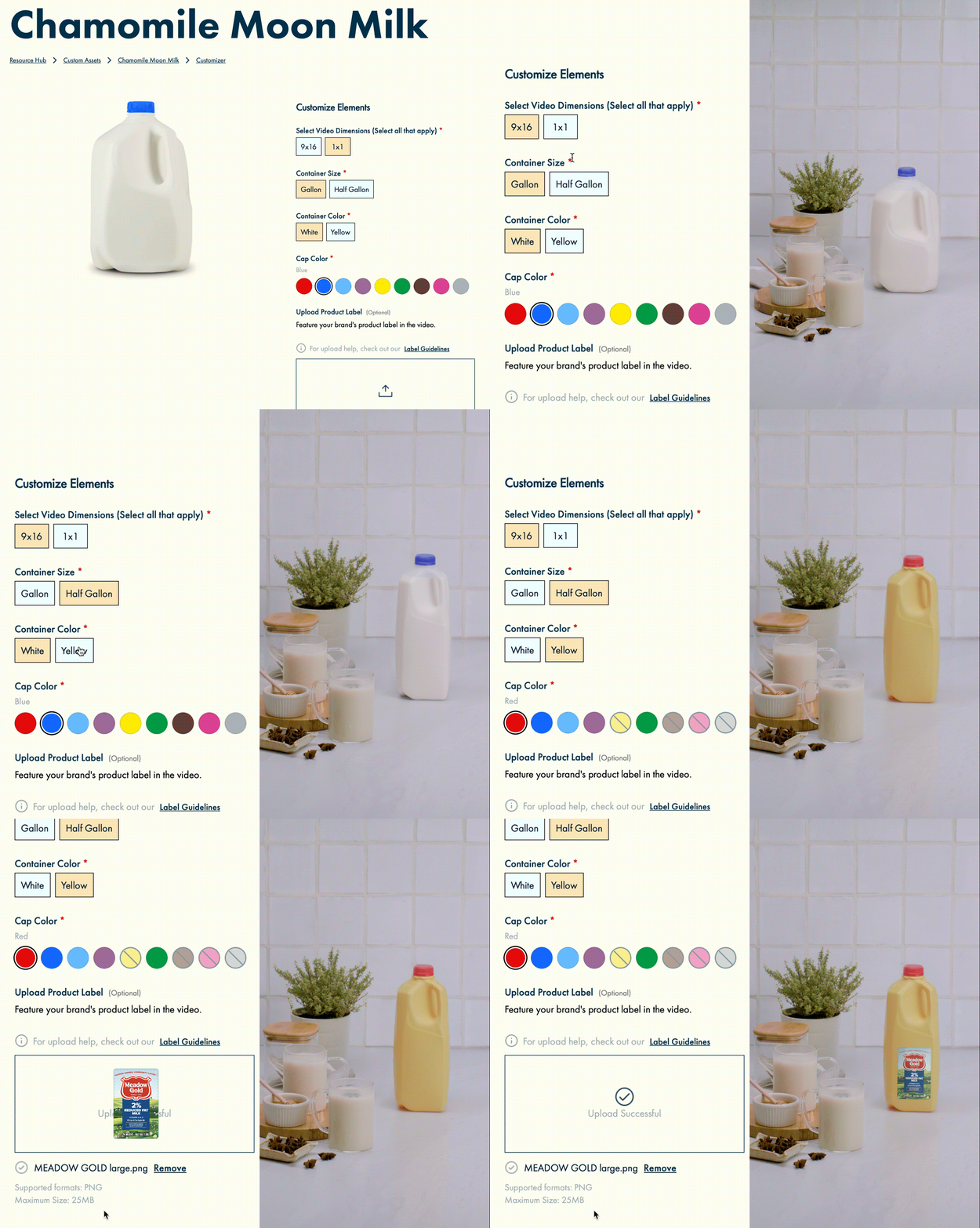
The brief was to build a self-service customization tool: a web interface through which any processor could select a recipe video from a curated library, specify their brand variables (label, vessel type, cap color, milk variety) and receive a finished, broadcast-quality video asset with their product composited into the original footage.
Shot as a food video. Built for the system.
The recipe videos were shot on a professional production with a single constraint that governed every decision: the milk vessel had to be placed and lit with enough precision that any processor’s label could be composited into the scene later, regardless of their product’s geometry.
This required maintaining exact continuity of vessel placement and orientation across every recipe: the same physical position in frame, the same lighting angle on the vessel surface, the same camera focal distance. What looked like a simple food video to the viewer was, at the production level, a carefully controlled reference for the depth-scanning compositing system that would follow.
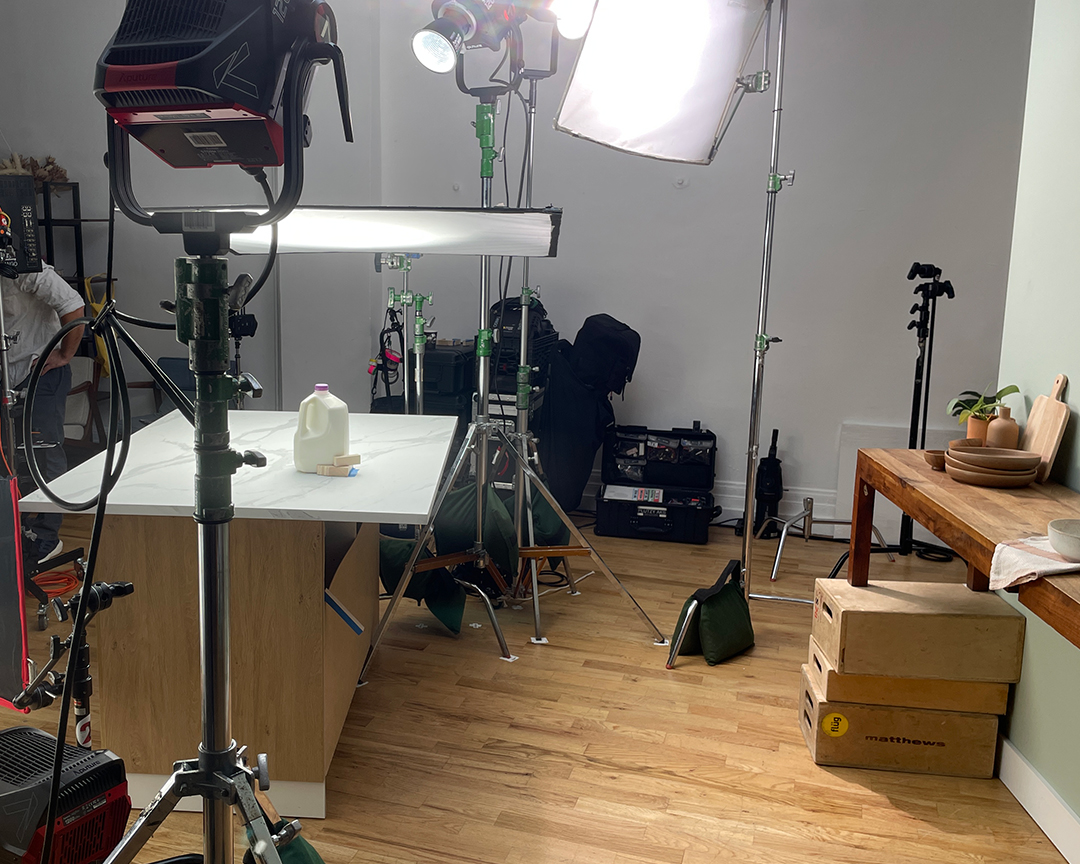
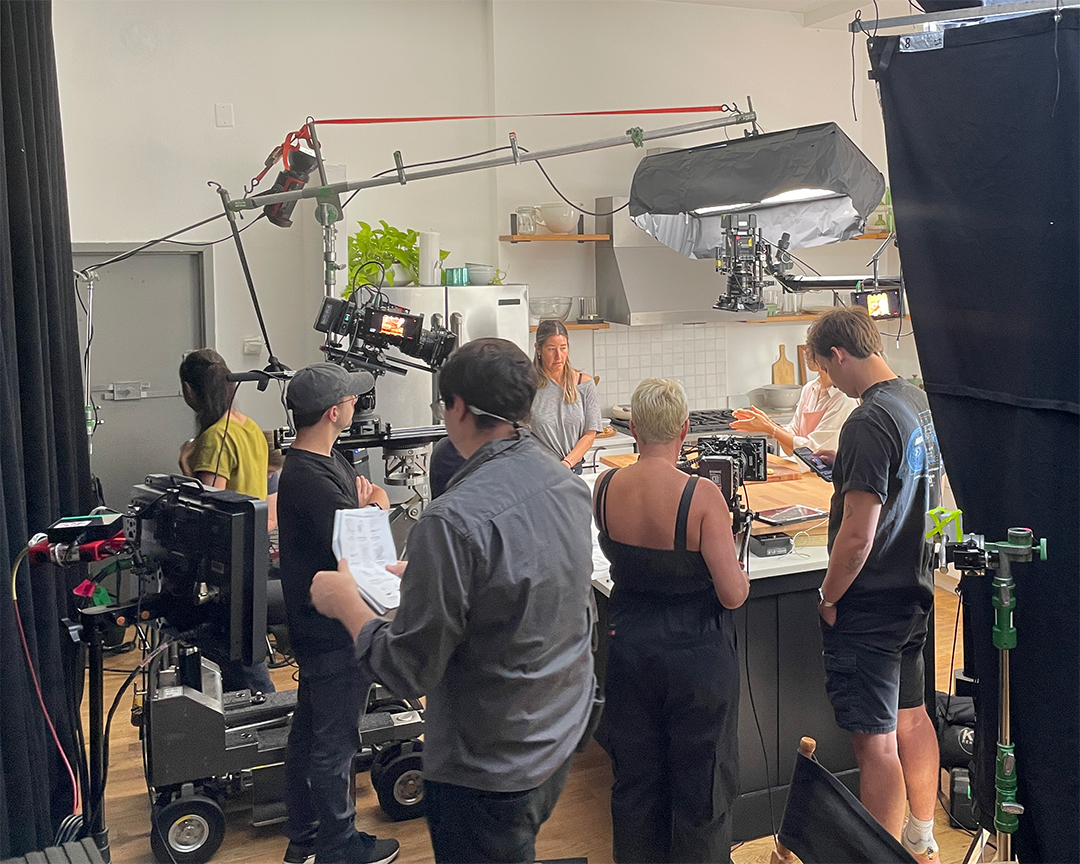

Footage was enhanced using a depth-scanning workflow to generate per-frame depth maps. Using a Depth Prediction Transformer, reflections on the vessel surface were analyzed to produce an accurate spatial map of the scene. An AI alignment algorithm then used this map to place the user’s uploaded label into the designated safe zone with correct perspective, foreshortening, and lighting response. The label does not sit on the footage. It sits in the footage.
One template per recipe. Every template shares the same contract.
Each recipe in the library has a corresponding After Effects project file built to a strict internal specification. The specification is the architecture, not documentation written after the fact. Every template was built to it from the start, because the rendering system has no tolerance for deviation: NexRender does not interpret, it reads.
Each template contains exactly two compositions whose names are fixed. NexRender locates the render target by composition name, not by path, not by index. Renaming either composition breaks the render job silently. The composition names are specified in the schema and treated as reserved strings throughout the project lifecycle.
Every template contains a layer named MILK_LABEL. This layer is blank in the source file. When a render job is triggered, NexRender replaces this layer with the user-uploaded label asset via the job manifest. The name MILK_LABEL is the only identifier the system uses to find the target. It cannot be abbreviated, translated, or reformatted: it is the layer name exactly as written.
The layer is pre-positioned and pre-parented to the vessel in the composition, so the incoming label asset inherits the correct transform data (position, rotation, scale, and the depth-derived distortion) without any additional instruction. The user uploads a flat image. The template does the placement work.
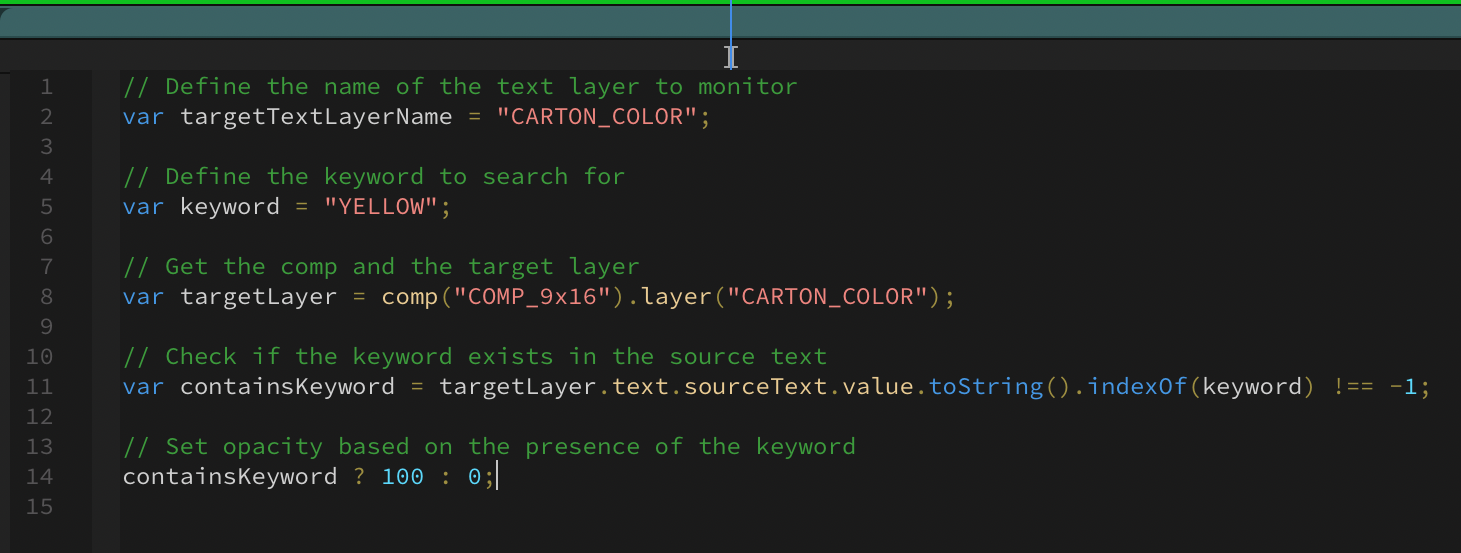
Milk variety (WHOLE, STRAWBERRY, CHOCOLATE, and so on) determines which precomposition is visible in the final render. This is controlled by three text layers in the export composition. Each text layer holds a keyword value. Expressions on the precomposition layers read these keyword values and evaluate them against a lookup to set layer opacity. The text layer content is the variable. The expression is the conditional logic. NexRender writes to the text layers; After Effects evaluates the result at render time.
Recipes that do not use chocolate milk do not include the chocolate precomposition at all. Each recipe has a specific composition set corresponding to the vessel variants available for that product. The schema specifies which compositions are present and what keyword values each one responds to.
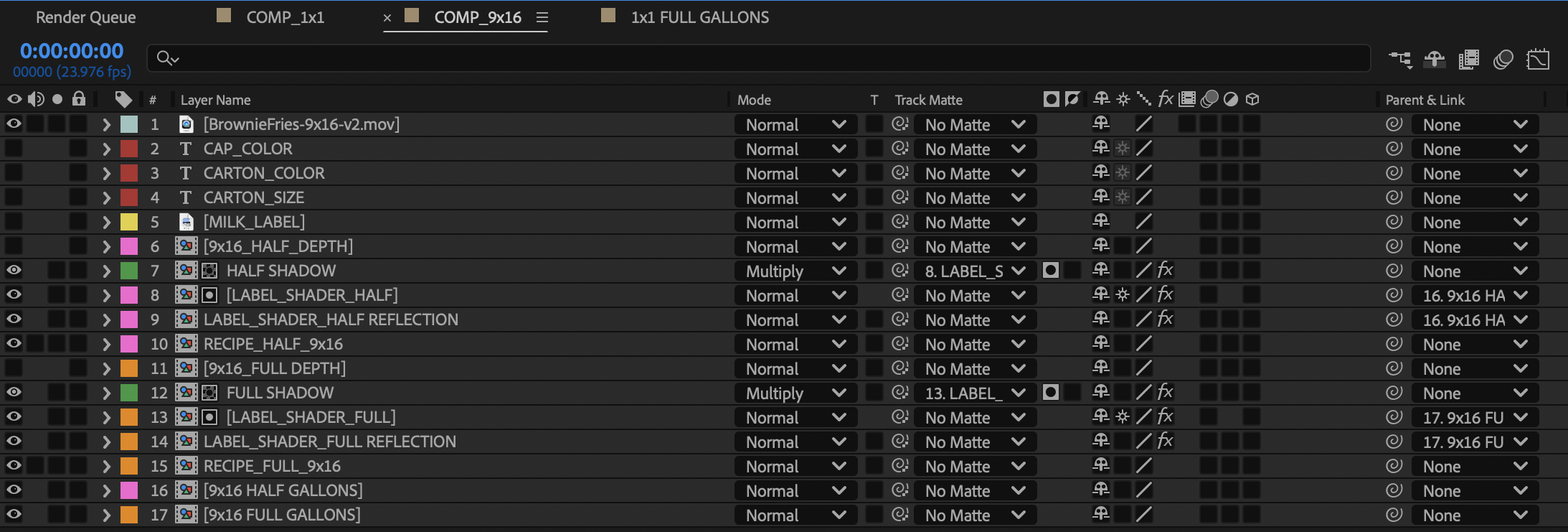
Long asset names cause decompression failures in the NexRender pipeline. This limit is not documented anywhere; it was found in testing. All source assets in the templates use short, unambiguous names. The depth map files, the precomposition source footage, and the label placeholder all follow a naming convention defined in the schema. A file named correctly in the wrong folder is as broken as a file named incorrectly anywhere.
A shared naming convention is the only interface between the template, the tool, and the render system.
The schema is a specification document that defines the exact keyword values used at every point in the pipeline: the form field labels in the web tool, the variables the backend passes to NexRender, the composition names the render job targets, and the expression keywords the After Effects template evaluates. If any of these disagree, the render either fails or produces the wrong output.
The schema was designed before any template was built. It is the contract the templates were written to satisfy, not a record of what they happen to contain.
Variable mapping
| Layer / field name | Keyword value | Controls |
|---|---|---|
| MILK_LABEL | – | Layer target for user-uploaded label asset; replaced by NexRender at job execution |
| milk_variety | whole / strawberry / chocolate / skim… | Expression keyword; drives precomp opacity via conditional lookup in export comp |
| vessel_type | JUG / CARTON / BOTTLE… | Determines which vessel precomp set is active; maps to composition name in schema |
| cap_color | RED / BLUE / WHITE / GREEN… | Drives cap layer visibility within active vessel precomp |
| carton_size | HALF-PINT / PINT / QUART / HALF-GALLON… | Scales vessel and label placement via parented null; size-specific compositions for non-standard formats |
Every keyword in the schema has a single canonical spelling. The frontend form, the backend API, and the After Effects expression all use the same string. There is no translation layer. A discrepancy anywhere in that chain produces a render where the variable is ignored, which means a finished video with the wrong product in frame, or no product at all. The schema is what makes silent failure impossible.
NexRender does not know what a milk processor is. It knows how to write a value to a text layer in an After Effects composition and trigger a render. The schema is everything between those two facts.
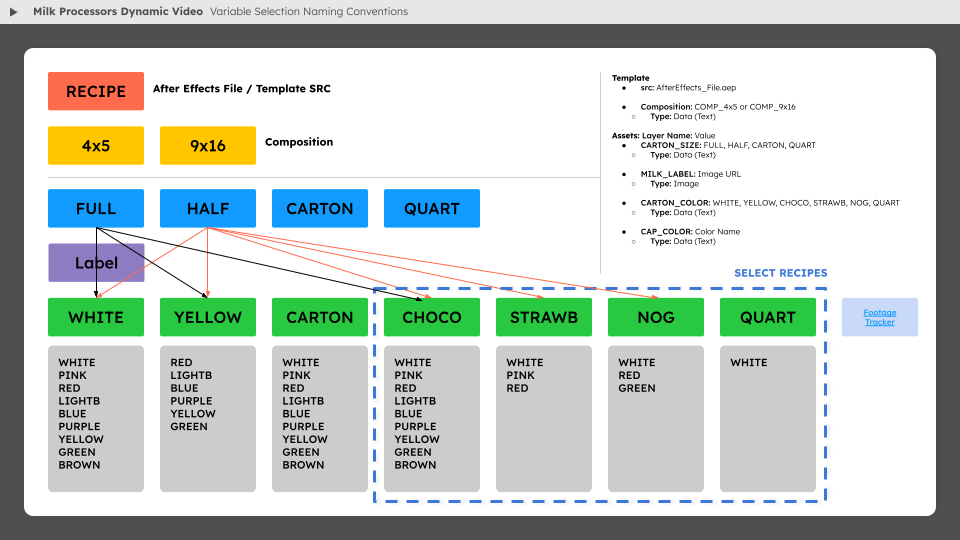
The complete variable specification, NexRender job manifest structure, expression syntax, and known failure modes are documented in the technical specification.
Three steps. One finished video.
The front end, built in Next.js against a Django API, presents the system as a three-step workflow: browse a gallery of recipe templates, review the asset details, then customize and submit. The complexity of the rendering pipeline is entirely invisible to the user.
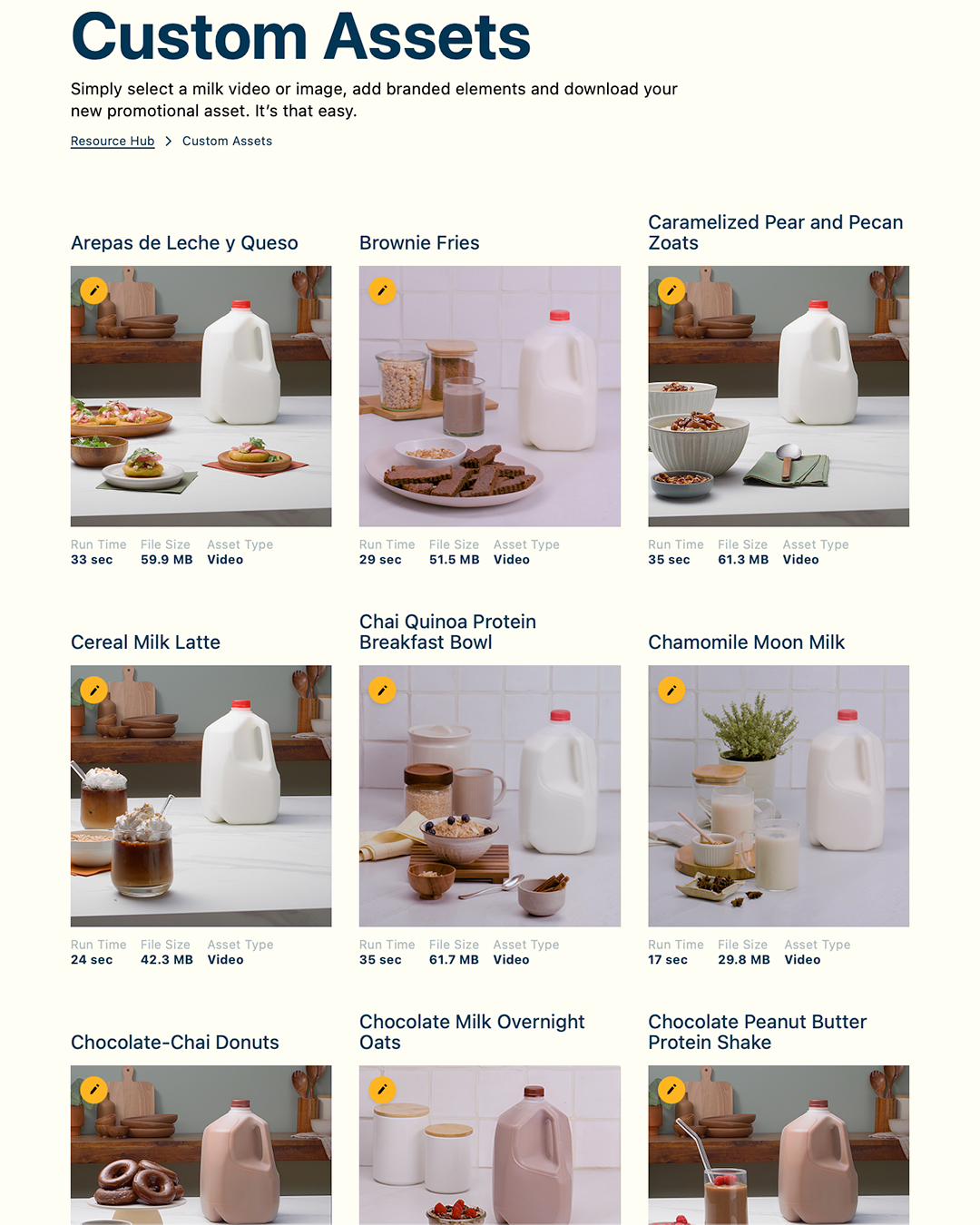
The landing page renders a responsive grid of template cards. Each card shows the recipe thumbnail, run time, file size, and asset type. The thumbnail images are served from S3 with preloads for the first visible rows. A pencil icon badge on each card indicates the asset is customizable. Skeleton loading states are handled with react-loading-skeleton while the template list hydrates from the API.
Selecting a template navigates to the asset detail page, which shows a larger preview of the recipe footage alongside the full specification: duration, output file size, available vessel types, and supported milk varieties for that recipe. The processor can verify the asset fits their use case before committing to the customization step.
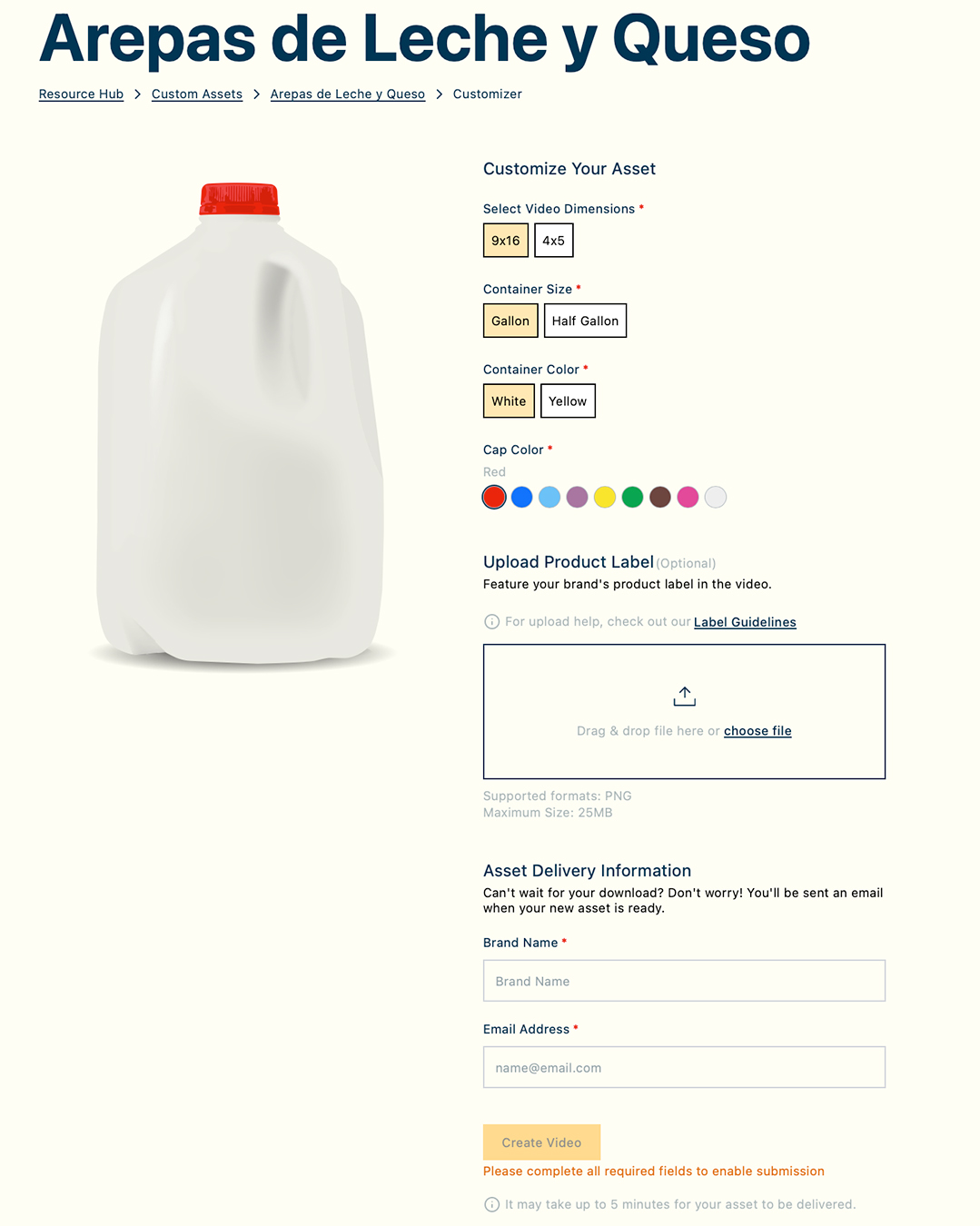
The customization form presents only the variables relevant to the selected recipe: vessel type options that exist in the template, milk varieties the template supports, cap colors valid for the chosen vessel. Selecting a combination updates a live preview. The label upload field accepts the processor’s brand artwork; the system handles the compositing.
On submission, the form values are validated against the schema, a NexRender job manifest is constructed, and the render job is queued. The processor receives a download link when the render is complete.
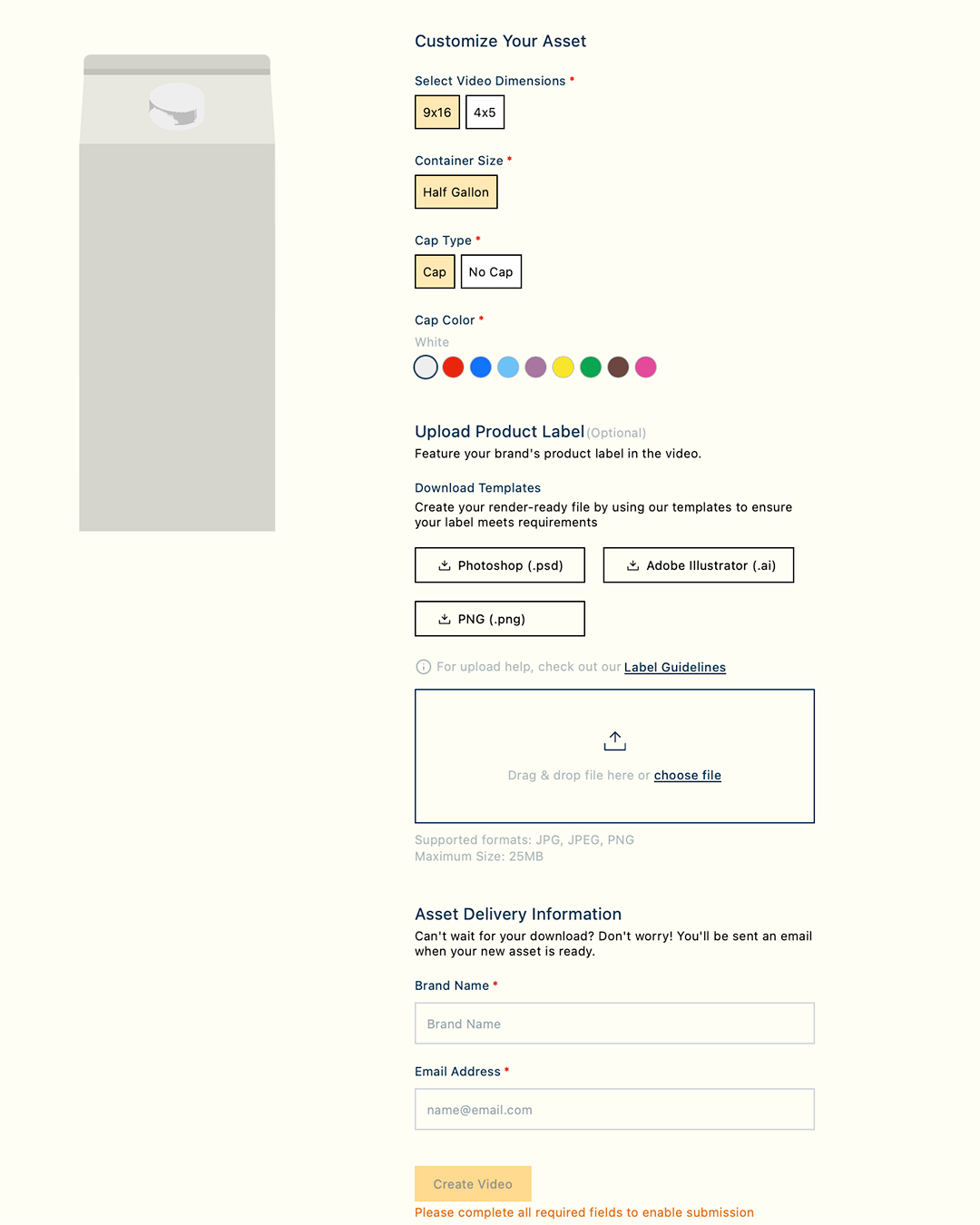
The complexity lives in the template, not in the render.
12,460 is the number of valid output combinations the system supports across all recipes, vessel types, vessel sizes, milk varieties, and cap colors, not a count of videos produced. Each combination represents a distinct After Effects render: a unique precomp configuration, label placement, and expression state.
That number is the product of decisions made during the template build. Every cap color that needed to work required a corresponding precomp layer and an expression branch. Every vessel size that differed from the default required a size-specific composition with its own label transform. Every milk variety required a footage variant with its own depth-composited label zone. None of this complexity exists at the render-time level: NexRender writes a keyword to a text layer and starts the queue. The complexity was resolved entirely in the template architecture.
An internal study that accompanied the project noted that what might have taken a software engineer a day or more to code was produced by an in-house motion designer using AI-assisted scripting. That is accurate for the variable-passing code on the backend. The After Effects work (building 28-plus templates that are each structurally identical in contract but visually unique in content, all to a specification precise enough that a web form can control them at render time) was done by hand.
A finished asset. No designer required.
The end result is a broadcast-quality video with the processor’s product composited into the original recipe footage: the label tracked to the vessel surface, lit by the same practical light that lit the shoot, sitting in the same depth plane as the physical vessel that was in the frame.
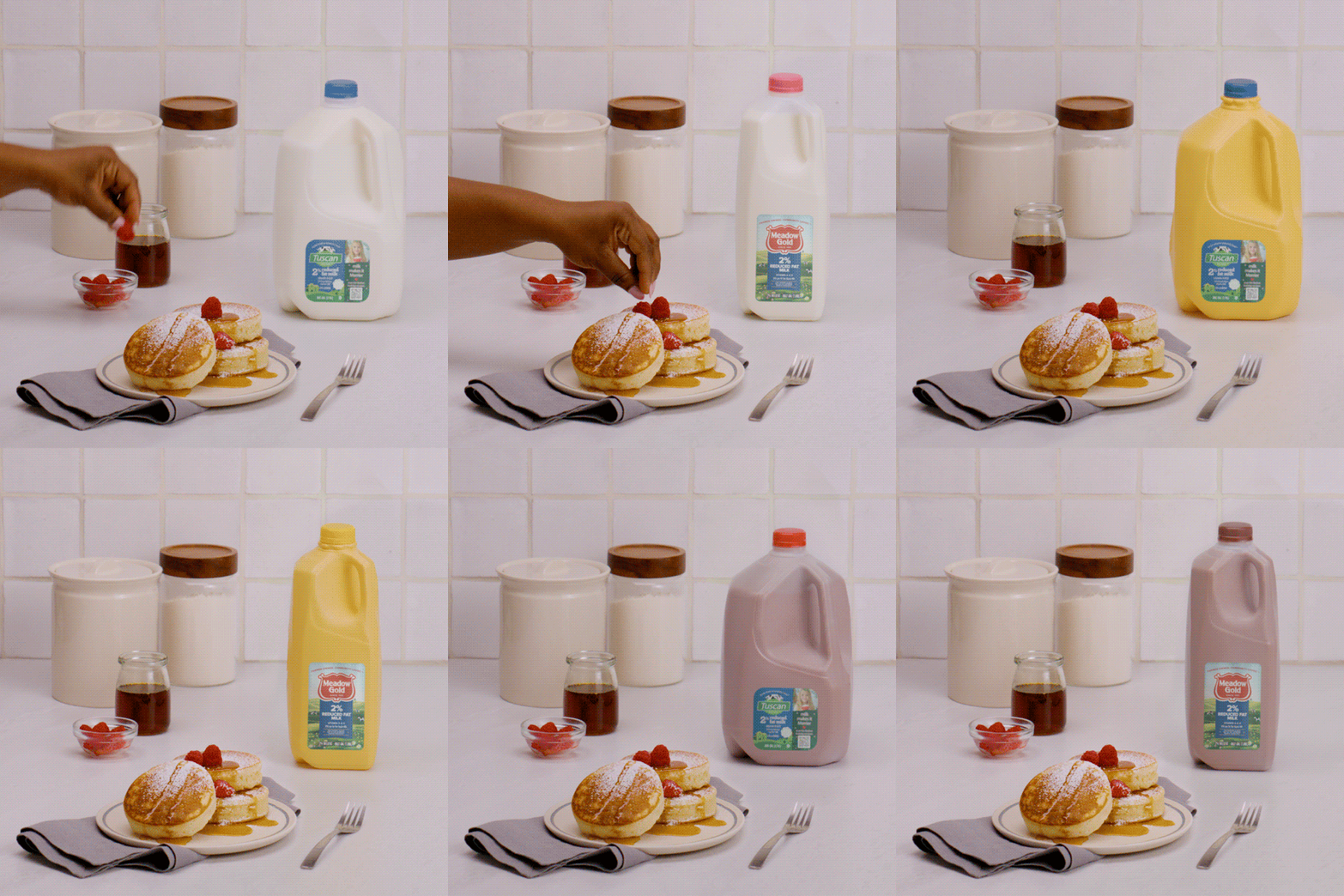
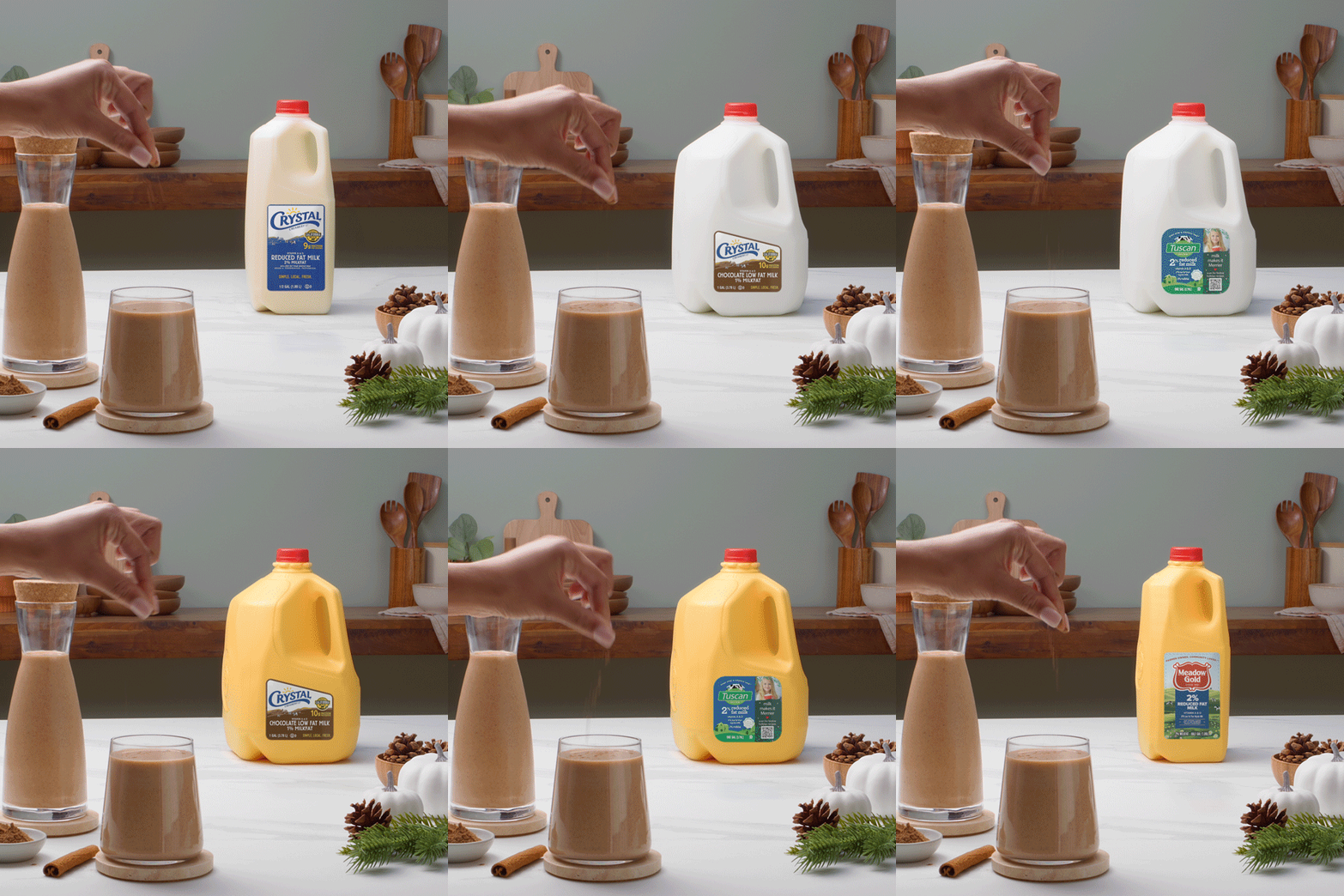
A processor with no creative department, no production budget, and no knowledge of After Effects submits a form and receives a file indistinguishable from a custom production. That was the brief. That is what the tool delivers.